
Edition #05 β€’ February 2026
AI Hustlers Logo

AI HUSTLERSS

2026 AI Strategy & Performance Blueprints

πŸŽ₯ FREE Claude Prompt That AUTO Turns Any Idea Into a VOX-Style Video (Full Guide)

This workflow turns one idea into a Vox-style animated video using 4 tools: Claude, ZAPI Flow, Google Flow, and CapCut. No coding required. No After Effects.

XRP Ledger Security

TL;DR

This workflow helps you turn one idea into a Vox-style animated video without coding or After Effects. You'll use Claude, ZAPI Flow, Google Flow, and CapCut.

Claude helps you write the script, split it into visual beats, and create matching prompts. ZAPI Flow sends those prompts to Google Flow in order, so you can generate the full image set without copying them one by one.

Google Flow turns each image into a short clip. You then arrange the clips in CapCut, trim the timing, and export the video.

Key points

  • Fact: Each image becomes one clip of about 5 to 6 seconds.
  • Mistake: Running the full batch before testing one image can repeat the same problem across every scene.
  • Takeaway: Check one image first and keep the characters, colors, and paper-cut style consistent.

Introduction

Look at this. Do you think it was made in After Effects? Or that someone spent hours animating every frame by hand? Haha... nope.

I have to say, I was surprised too. This entire video started with a few still images, that's it.

Vox-style animation hotel lobby scene

In this guide, I'll show you exactly how I made this Vox-style animation using:

  • Claude β†’ Write the script, break it into visual beats, and generate all the prompts.
  • ZAPI Flow β†’ Run every prompt automatically in the correct order.
  • Google Flow β†’ Generate the images and turn each one into an animated video clip.
  • CapCut β†’ Put everything together and polish the final video.

I'll also share the tricks I used to keep the characters, colors, camera angles, and paper-cut style consistent across every scene, because that's the part most people struggle with.

πŸ“Ί What stops you from making Vox-style videos?

Login or Subscribe to participate in polls.

Step 1: Write the Script in Claude

Before you create images with an AI animation generator, you need a clear script. And not just any script, it must be one where every sentence describes something you can actually show on screen.

What you're building in this step:

  • A 60-second documentary-style script (around 130–150 words)
  • Each sentence = one clear visual moment

1a. Set Up Claude

Open a new Claude chat and paste this prompt. The key line is "one step at a time", don't jump to image prompts before the script is done.

You're helping me create a Vox-style animated documentary video.

Please guide me through the process one step at a time.

For now, only help me create the video idea and script. Don't create image prompts or video prompts yet.

The video should have:

  • - A clear documentary story
  • - Short scenes that are easy to turn into images
  • - Simple and natural language
  • - A strong opening
  • - Smooth connections between events
  • - A clear ending

First, ask me for my niche, video length, and topic.

After I answer, give me 10 video ideas that can work well as Vox-style animation.

You're helping me create a Vox-style animated documentary video.

Please guide me through the process one step at a time.

For now, only help me create the video idea and script. Don't create image prompts or video prompts yet.

The video should have:

  • - A clear documentary story
  • - Short scenes that are easy to turn into images
  • - Simple and natural language
  • - A strong opening
  • - Smooth connections between events
  • - A clear ending

First, ask me for my niche, video length, and topic.

After I answer, give me 10 video ideas that can work well as Vox-style animation.

What's your niche, target video length, and topic?

Claude will ask you for some basic information. You can answer with a message like this:

My niche is history and unusual true stories.

I want to make a 60-second video.

I don't have a topic yet. Please give me 10 ideas with a clear main character, problem, and ending.

My niche is history and unusual true stories.

I want to make a 60-second video.

I don't have a topic yet. Please give me 10 ideas with a clear main character, problem, and ending.

Synthesized historical narratives with protagonist-conflict-resolution arcs

Here are 10 ideas. Each fits a 60-second format with a clear arc.

1. The Man Who Sold the Eiffel Tower

Victor Lustig, a con artist, poses as a government official and convinces a scrap metal dealer to "buy" the Eiffel Tower for scrap. He collects the bribe and vanishes before anyone realizes it's a scam. Ends with him repeating the con a second time on a different dealer.

2. The Pirate Who Became a Queen's Bodyguard

Ching Shih, a Chinese prostitute, marries a pirate lord and takes command of his fleet after his death. She builds the largest pirate armada in history and later negotiates full amnesty with the Chinese government, retiring wealthy and untouched.

3. The Soldier Who Fought WWII for 29 Years

Hiroo Onoda, a Japanese soldier, refuses to believe the war ended and hides in the Philippine jungle for decades. He's finally found in 1974 and only surrenders after his original commanding officer flies out to personally relieve him of duty.

4. The Doctor Who Proved Doctors Were Killing Patients

Ignaz Semmelweis notices new mothers die less often when doctors wash their hands. He's mocked and rejected by the medical community for the idea. He dies in an asylum, years before germ theory proves him right.

5. The Woman Who Faked Her Way Into Antarctica

Ronald Amundsen's rival, Robert Falcon Scott, races to the South Pole and loses. But the twist: a lesser-known stowaway on his ship changes clothes and identity to join the crew. (Note: verify this one, it's a shakier premise; check app for a fully confirmed story before scripting.)

+Write a message...
Sonnet 3.5πŸŽ™οΈ

You can change the niche and video length to match your channel.

1b. Choose an Idea and Build a Story Plan

Once Claude gives you 10 ideas, pick the one with the clearest people, places, and events. Stories with a single main character and a clear turning point are easiest to animate.

Then ask Claude to plan it out before writing the full script:

I want to use this idea:

[PASTE YOUR IDEA HERE]

Before you write the full script, create a short story plan.

Please include:

  • - The opening hook
  • - The main character or subject
  • - The important events in order
  • - The main turning point
  • - The ending

Keep the story simple enough for a 60-second video.
I want to use this idea:

The Man Who Sold the Eiffel Tower

Victor Lustig, a con artist, pretends to be a French government official and tells a scrap metal dealer that the Eiffel Tower is being sold for scrap. He takes the payment, leaves Paris, and later returns to repeat the same scam.

Before you write the full script, create a short story plan.

Please include:

- The opening hook

- Victor Lustig as the main character

Architected narrative framework for con artist story

Facts check out. Key details: 1925, HΓ΄tel de Crillon, posed as deputy director general of the Ministry of Posts and Telegraphs, six scrap dealers invited, AndrΓ© Poisson was the mark, bribe requested on top of the price, Lustig fled to Vienna/Austria, and he later tried the scam a second time in Paris.

Here's the story plan:

Opening Hook

Paris, 1925. A man checks into the city's most luxurious hotel, claiming to be a top government official. He's about to sell the most famous landmark in France. It doesn't belong to him.

Main Character

Victor Lustig β€” con artist, expert at reading people, calm under pressure.

Key Events in Order

  1. Lustig arrives in Paris and reads about the huge cost of maintaining the Eiffel Tower.
  2. He rents a room at the HΓ΄tel de Crillon and poses as a deputy minister.
  3. He invites six scrap dealers to a secret meeting, claiming the tower will be sold quietly for scrap to avoid public backlash.
  4. He picks AndrΓ© Poisson as his target, sensing Poisson's eagerness to prove himself in Paris business circles.

The Moment Poisson Believes It

Lustig takes the dealers on a private tour of the tower, using forged access documents.

+Write a message...
Sonnet 3.5πŸŽ™οΈ

Read the plan back. If it feels too crowded or skips a key moment, ask Claude to adjust it now, it's much faster to fix at this stage than after the full script is written.

1c. Write the Full Script

When the story plan looks good, paste this:

Now write the full 60-second script based on this story plan.

Please follow these rules:

  • - Start with a strong hook in the first two sentences
  • - Use a natural documentary voice
  • - Make every sentence easy to show as an image
  • - Connect the events clearly
  • - Remove unnecessary background details
  • - Don't include camera instructions
  • - Don't include scene numbers
  • - Don't include image prompts
  • - Keep the script between 130 and 150 words

After the script, show me the exact word count.

Now write the full 60-second script based on this story plan.

Please follow these rules:

- Start with a strong hook in the first two sentences

- Use a natural documentary voice

- Make every sentence easy to show as an image

Strategized visual clarity and narrative coherence for documentary script

In 1925, a stranger checked into Paris's finest hotel. He told the staff he worked for the government.

His name was Victor Lustig. He'd spent years running small cons across Europe. In Paris, he read an article about the Eiffel Tower. The tower was costing France a fortune to maintain. Lustig saw an opportunity.

He invented a story. The government wanted to sell the tower for scrap, quietly, before the public found out. He rented a suite at the HΓ΄tel de Crillon. He wore a sharp suit and carried forged government papers.

He invited six scrap metal dealers to a secret meeting. He introduced himself as a deputy minister. One dealer stood out: AndrΓ© Poisson, new to Paris and eager to prove himself.

Lustig showed a fake pass at the gate. He walked Poisson straight to the tower. Standing beneath the iron beams, Poisson stopped doubting. He started imagining the tower as his own.

A few days later, they met again to finalize the deal. Lustig leaned in close. He hinted that his government salary was thin. A small bribe, he said, would seal the contract. Poisson paid everything on the spot, cash in hand.

Lustig vanished that same night. Poisson stayed silent, too ashamed to admit he'd been fooled.

Weeks later, Lustig returned to Paris. He gathered a new group of dealers. He tried the exact same con again.

+Write a message...
Sonnet 3.5πŸŽ™οΈ

Read each sentence and ask yourself: can I picture a single, clear image for this?If a sentence describes two actions or jumps between places, it'll confuse the image model later.

If you spot any that are too crowded, paste this:

Please review this script for visual clarity.

Find any sentence that includes too many actions, places, or ideas for one scene.

Rewrite only those sentences.

Each new sentence should describe one clear visual moment.

Keep the original meaning, tone, and length as close as possible.

Please review this script for visual clarity.

Find any sentence that includes too many actions, places, or ideas for one scene.

Rewrite only those sentences.

Each new sentence should describe one clear visual moment.

Pinpointing where the script overwhelms viewers with excessive narrative density

Flagged sentences and rewrites:

Original: "The government wanted to sell the tower for scrap, quietly, before the public found out."

Rewrite: "The government wanted to sell the tower for scrap. It had to happen quietly, before the public found out."

Original: "He wore a sharp suit and carried forged government papers."

Rewrite: "He wore a sharp suit. In his briefcase, he carried forged government papers."

Original: "One dealer stood out: AndrΓ© Poisson, new to Paris and eager to prove himself."

Rewrite: "One dealer stood out: AndrΓ© Poisson. He was new to Paris and eager to prove himself."

Original: "A few days later, they met again to finalize the deal."

Rewrite: "A few days later, Lustig and Poisson met again. This time, they finalized the deal."

Original: "Poisson stayed silent, too ashamed to admit he'd been fooled."

Rewrite: "Poisson stayed silent. He was too ashamed to admit he'd been fooled."

All other sentences already carry one clear visual idea each. This adds five sentences, pushing the word count up. Want a trim pass to bring it back into your target range?

+Write a message...
Sonnet 3.5πŸŽ™οΈ

At the end of this step, you should have a clean 130–150 word script where every sentence is something you can picture.

Step 2: Turn the Script Into Visual Beats and Image Prompts

Now you take that script and break it apart into individual scenes. Each "visual beat" is one moment, one image, in your story. This is where your animation actually takes shape.

What you're building in this step:

  • A numbered list of visual beats (one per scene)
  • One image prompt per beat
  • A clean TXT file ready for ZAPI Flow

2a. Create the Visual Beats

Paste this into Claude with your finished script:

I want you to turn my script into visual beats for a Vox-style animated documentary video.

Please read the full script and divide it into short visual scenes.

Follow these rules:

  • - Each visual beat should show one clear visual moment
  • - Keep the beats in the same order as the script
  • - Use simple and easy-to-follow language
  • - Don't skip important events
  • - Don't add new facts that are not in the script
  • - Make the beats suitable for image generation later
  • - Keep the pacing right for a 60-second video

Please return:

  • - Numbered visual beats
  • - One sentence per beat
  • - A short note for each beat that explains what should be shown on screen

Here is the script:

[PASTE YOUR FINAL SCRIPT HERE]

I want you to turn my script into visual beats for a Vox-style animated documentary video.

Please read the full script and divide it into short visual scenes.

Follow these rules:

1. A well-dressed stranger checks into a grand Paris hotel in 1925.

Show: A man in a fine suit at a hotel front desk, bellhops nearby, elegant lobby.

2. He tells the hotel staff he works for the government.

Show: The man handing over an official-looking card or badge to the staff.

3. His name was Victor Lustig, a man who'd run small cons across Europe for years.

Show: A close-up portrait shot of Lustig, sharp eyes, confident posture.

4. In Paris, he reads a newspaper article about the Eiffel Tower.

Show: Lustig seated, reading a newspaper with a headline about the tower.

5. The article says the tower is costing France a fortune to maintain.

Show: A shot of the Eiffel Tower looking worn or under repair scaffolding.

6. Lustig sees an opportunity.

Show: A sly smile crossing Lustig's face as he lowers the newspaper.

7. He invents a story: the government wants to sell the tower for scrap.

Show: Lustig sketching or writing at a desk, papers with official letterhead.

8. It has to happen quietly, before the public finds out.

Show: Lustig sealing an envelope, glancing around cautiously.

9. He rents a suite at the HΓ΄tel de Crillon.

Show: An elegant hotel suite, luxurious furniture, a view of Paris.

10. He wears a sharp suit for the occasion.

Show: Lustig adjusting his suit jacket in front of a mirror.

11. In his briefcase, he carries forged government papers.

Show: A close-up of a briefcase opening to reveal official-looking documents.

+Write a message...
Sonnet 3.5πŸŽ™οΈ

After Claude gives you the list, quickly scan it. If any beat still has two actions or feels too busy for one image, use this:

Please review these visual beats.

If any visual beat includes too many actions, details, or visual ideas for one image, split it into smaller beats.

Please keep the story order unchanged.

Return the improved numbered visual beats only.

Please review these visual beats.

If any visual beat includes too many actions, details, or visual ideas for one image, split it into smaller beats.

Please keep the story order unchanged.

Identified and flagged composite beats requiring subdivision

1. A well-dressed stranger checks into a grand Paris hotel in 1925.

Show: A man in a fine suit at a hotel front desk, bellhops nearby, elegant lobby.

2. He tells the hotel staff he works for the government.

Show: The man handing over an official-looking card or badge to the staff.

3. His name was Victor Lustig, a man who'd run small cons across Europe for years.

Show: A close-up portrait shot of Lustig, sharp eyes, confident posture.

4. In Paris, he reads a newspaper article about the Eiffel Tower.

Show: Lustig seated, reading a newspaper with a headline about the tower.

5. The article says the tower is costing France a fortune to maintain.

Show: A shot of the Eiffel Tower looking worn or under repair scaffolding.

6. Lustig sees an opportunity.

Show: A sly smile crossing Lustig's face as he lowers the newspaper.

7. He invents a story: the government wants to sell the tower for scrap.

Show: Lustig sketching or writing at a desk, papers with official letterhead.

8. It has to happen quietly.

Show: Lustig sealing an envelope at his desk.

9. He glances around cautiously before sending it.

Show: Lustig looking over his shoulder, envelope in hand.

10. He rents a suite at the HΓ΄tel de Crillon.

Show: An elegant hotel suite, luxurious furniture, a view of Paris.

11. He wears a sharp suit for the occasion.

+Write a message...
Sonnet 5 MediumπŸŽ€πŸ”Š

2b. Write One Image Prompt Per Beat

This is the most important prompt in the whole workflow. The quality of your images depends directly on how well these prompts describe the paper-cut style and character consistency.

Now create one image prompt for each visual beat.

I want these prompts for a Vox-style animated documentary video.

Please follow these rules for every prompt:

  • - Keep the same story order
  • - Keep the same character identity across scenes
  • - Use a clean Vox-style paper-cut illustration look
  • - Use simple shapes, flat layers, and soft colors
  • - Make the composition clear and easy to understand
  • - Describe the main subject, background, action, and mood
  • - Keep the prompt suitable for 16:9 image generation
  • - Avoid extra details that may confuse the image model
  • - Don't include camera movement because these are image prompts
  • - Don't include quotation marks around the prompt text

For each visual beat, return:

  • - Beat number
  • - A short beat title
  • - The full image prompt

Please keep the style consistent across all prompts.

Now create one image prompt for each visual beat.

I want these prompts for a Vox-style animated documentary video.

Please follow these rules for every prompt:

Established consistent visual framework for documentary illustration style

1. A Stranger Arrives

Vox-style paper-cut illustration, flat layers, simple geometric shapes, soft muted color palette of cream and deep blue. Main subject is a slim man in a sharp gray suit and thin mustache standing at a hotel front desk. Background shows an elegant Paris hotel lobby with a chandelier and bellhops in flat silhouette. He hands papers to a clerk with a confident posture. Mood is composed and quietly confident. Clean flat lighting, minimalist shapes, 16:9 composition.

2. Claiming Government Work

Vox-style paper-cut illustration, flat layers, soft muted colors of cream and deep blue. Main subject is the same slim man in a gray suit handing an official-looking card to a hotel clerk at a wooden desk. Background is a simple hotel lobby with flat shapes. His expression is calm and assured. Mood is confident and deceptive. Clean flat lighting, minimal detail, 16:9 composition.

3. Meet Victor Lustig

Vox-style paper-cut illustration, flat layers, soft muted color palette. Main subject is a close-up portrait of a slim man with sharp eyes, thin mustache, and a gray suit, standing against a plain cream background. His posture is confident, chin slightly raised. Mood is sly and self-assured. Clean flat lighting, simple shapes, 16:9 composition.

4. Reading the Article

Vox-style paper-cut illustration, flat layers, soft muted colors of cream and warm brown. Main subject is the same slim man in a gray suit seated in an armchair, reading a...

+Write a message...
Sonnet 3.5πŸŽ™οΈ

If you feel the style descriptions could be stronger, send this quick follow-up:

Please make sure every prompt keeps a consistent Vox-style visual language with paper-cut shapes, documentary-style composition, and simple layered backgrounds.

Please make sure every prompt keeps a consistent Vox-style visual language with paper-cut shapes, documentary-style composition, and simple layered backgrounds.

Audited visual consistency across prompts and refined language

Here are the 33 prompts with consistent phrasing locked in across all of them:

1. A Stranger Arrives

Vox-style documentary illustration, paper-cut shapes, simple layered background, soft muted color palette of cream and deep blue. Main subject is a slim man in a sharp gray suit and thin mustache standing at a hotel front desk. Background layer shows an elegant Paris hotel lobby with a chandelier and bellhops in flat silhouette. He hands papers to a clerk with a confident posture. Mood is composed and quietly confident. Clean flat lighting, 16:9 composition.

2. Claiming Government Work

Vox-style documentary illustration, paper-cut shapes, simple layered background, soft muted colors of cream and deep blue. Main subject is the same slim man in a gray suit handing an official-looking card to a hotel clerk at a wooden desk. Background layer is a simple hotel lobby. His expression is calm and assured. Mood is confident and deceptive. Clean flat lighting, 16:9 composition.

3. Meet Victor Lustig

Vox-style documentary illustration, paper-cut shapes, simple layered background, soft muted color palette. Main subject is a close-up portrait of a slim man with sharp eyes, thin mustache, and a gray suit, set against a plain cream background layer. His posture is confident, chin slightly raised. Mood is sly and self-assured. Clean flat lighting, 16:9 composition.

4. Reading the Article

Vox-style documentary illustration, paper-cut shapes, simple layered background, soft muted colors of cream and warm brown. Main subject is the same slim man in a gray suit seated in an armchair, reading a folded newspaper. Background layer is a simple...

+Write a message...
Sonnet 5 MediumπŸ”Š

2c. Export a Clean TXT File for ZAPI Flow

ZAPI Flow only needs the raw prompts: one per line, no labels or numbering. Ask Claude to strip everything else:

Please turn all of the image prompts into a clean TXT-style output for batch image generation.

Follow these rules:

  • - Keep the prompts in the same order
  • - Put each full image prompt on a new line
  • - Don't include beat titles
  • - Don't include numbering
  • - Don't include notes or explanations
  • - Don't add any extra text before or after the prompts

Please return only the final TXT content.

Please turn all of the image prompts into a clean TXT-style output for batch image generation.

Formatted prompts into clean txt-format without annotations

33 prompts, one per line, ready for batch generation:

Eiffel tower-image prompts.txt
πŸ“‹ Copy⬇️ Download

1. Vox-style documentary illustration, paper-cut shapes, simple layered background, soft muted color palette of cream and deep blue...

+Write a message...
Sonnet 5 MediumπŸŽ€πŸ”Š

Copy the full output and save it as a .txt file on your computer. That file is what goes into ZAPI Flow in the next step.

Step 3: Generate Images with ZAPI Flow + Google Flow

So now, ZAPI Flow (install it first) reads your TXT file and sends each prompt to Google Flow one by one, so you don't have to copy-paste 10 or 15 prompts by hand.

But first, read these two things before you start:

⚠️ ZAPI Flow bug warning:

As of July 2026, multiple users report a queue stall bug where the extension stops after the first image and doesn't move to the second prompt. A separate bug affects large batches: past around image 40, the extension may download old images with new filenames. Keep the progress panel visible throughout, and check file names as you go. If it stalls, refresh Google Flow and reopen the extension.

πŸ’‘On Nano Banana Pro vs Nano Banana 2: Nano Banana 2 is now the free default model in Flow (zero credits per image), while Nano Banana Pro requires a paid Google AI subscription. For most people doing this workflow, Nano Banana 2 is the practical starting point. Switch to Pro only if you need 4K output or have a paid plan.

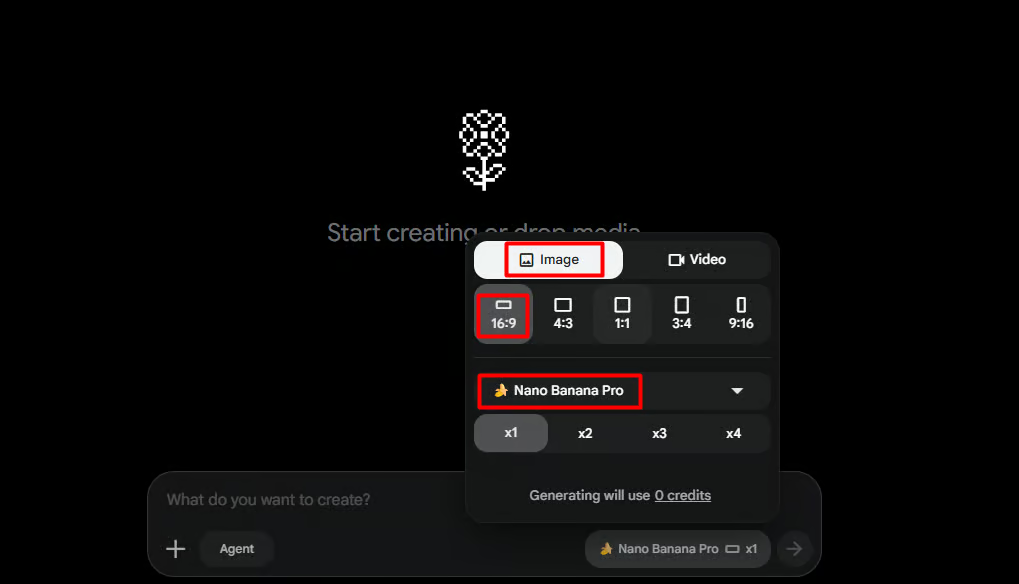
3a. Set Up Google Flow

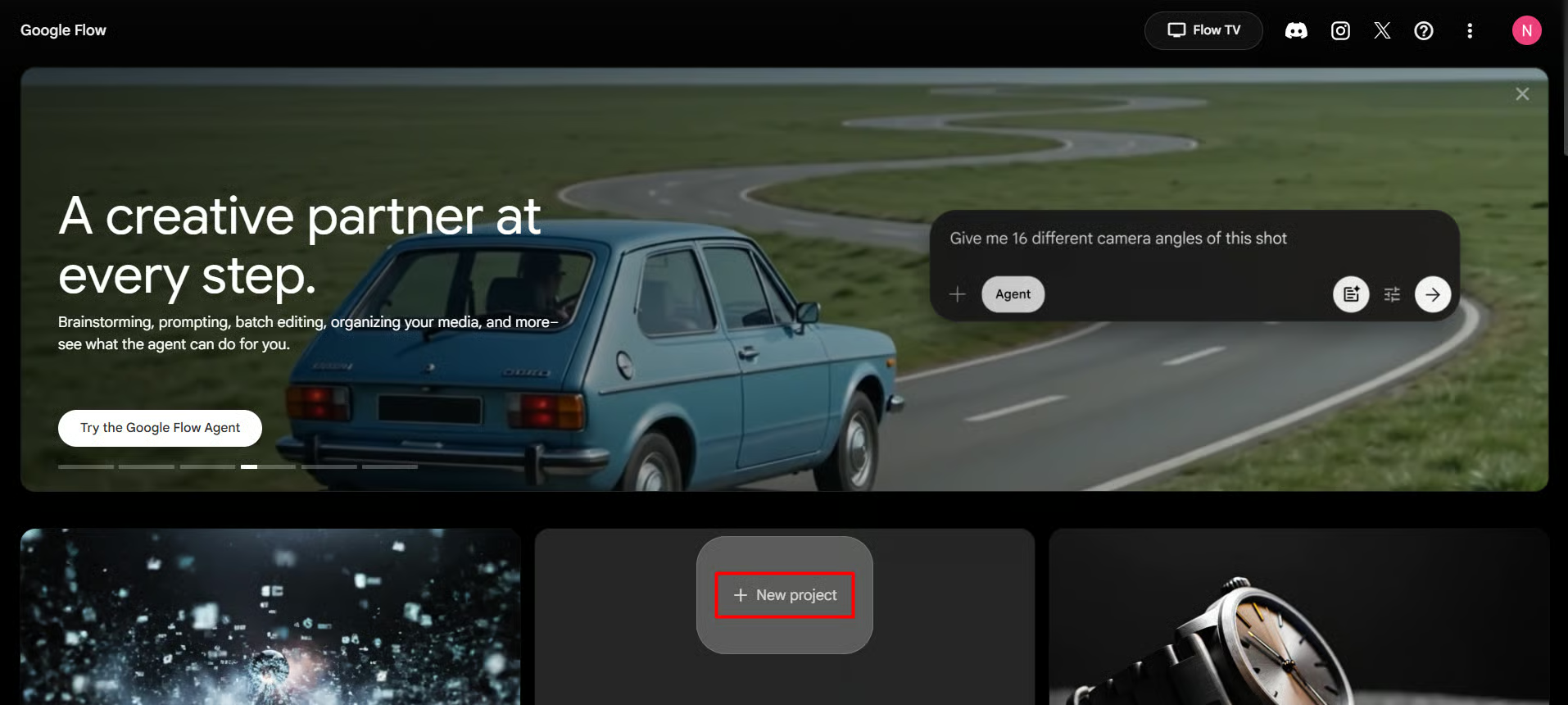
Go to labs.google/fx/tools/flow, create a new project, and switch to image generation mode.

Settings to use:

  • Aspect ratio: 16:9 (matches video format)
  • Model: Nano Banana 2 (free default) or Nano Banana Pro (paid)
  • Outputs per prompt: 1. You should open Google Flow, select Create a New Project, and switch from video generation to image generation.
Google Flow - A creative partner at every step interface showing New Project button

Google Flow interface highlighting the "New project" button.

Google Flow - Start creating interface with Image mode, 16:9 ratio, and Nano Banana Pro model settings

Google Flow generation panel showing Image mode, 16:9 aspect ratio, and model selection.

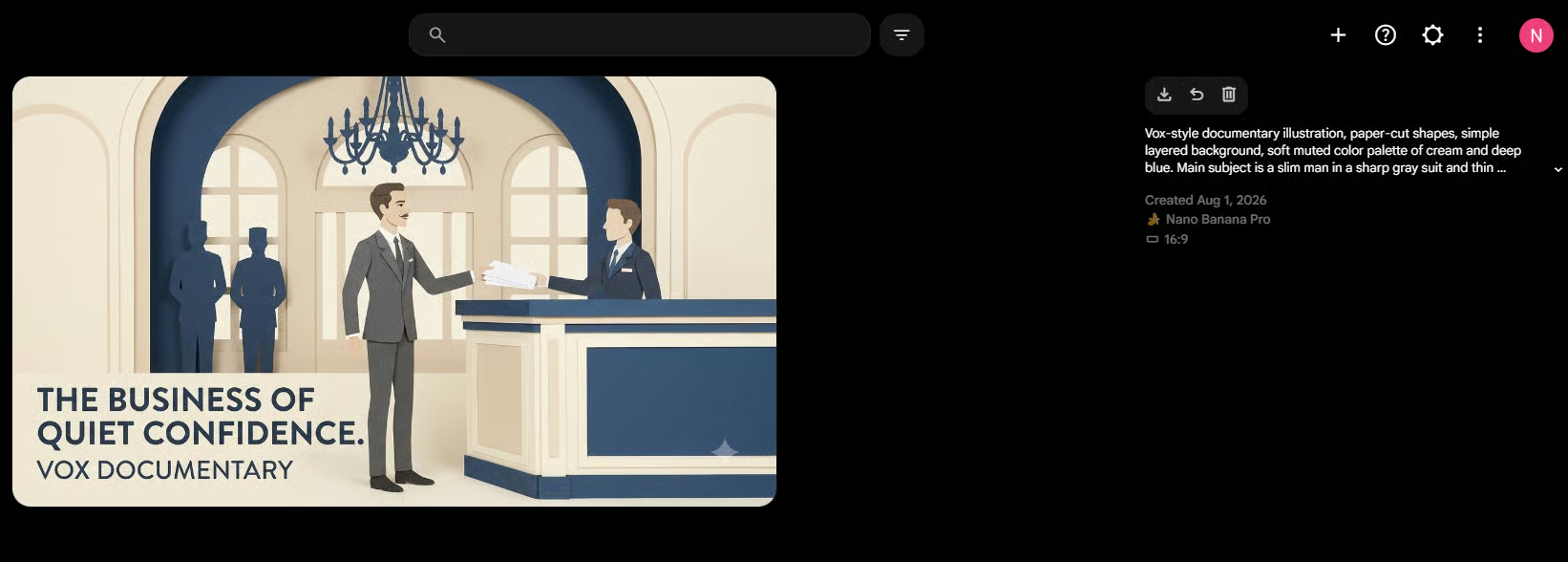
Before you run the full batch, test one prompt manually.Copy your first prompt from the TXT file, paste it directly into Google Flow, and generate. Check that the character, colors, composition, and paper-cut style look right. If they don't, fix the style description in the prompt and test again.

ZAPI Flow setup showing generated Vox documentary style image interface

3b. Set Up ZAPI Flow

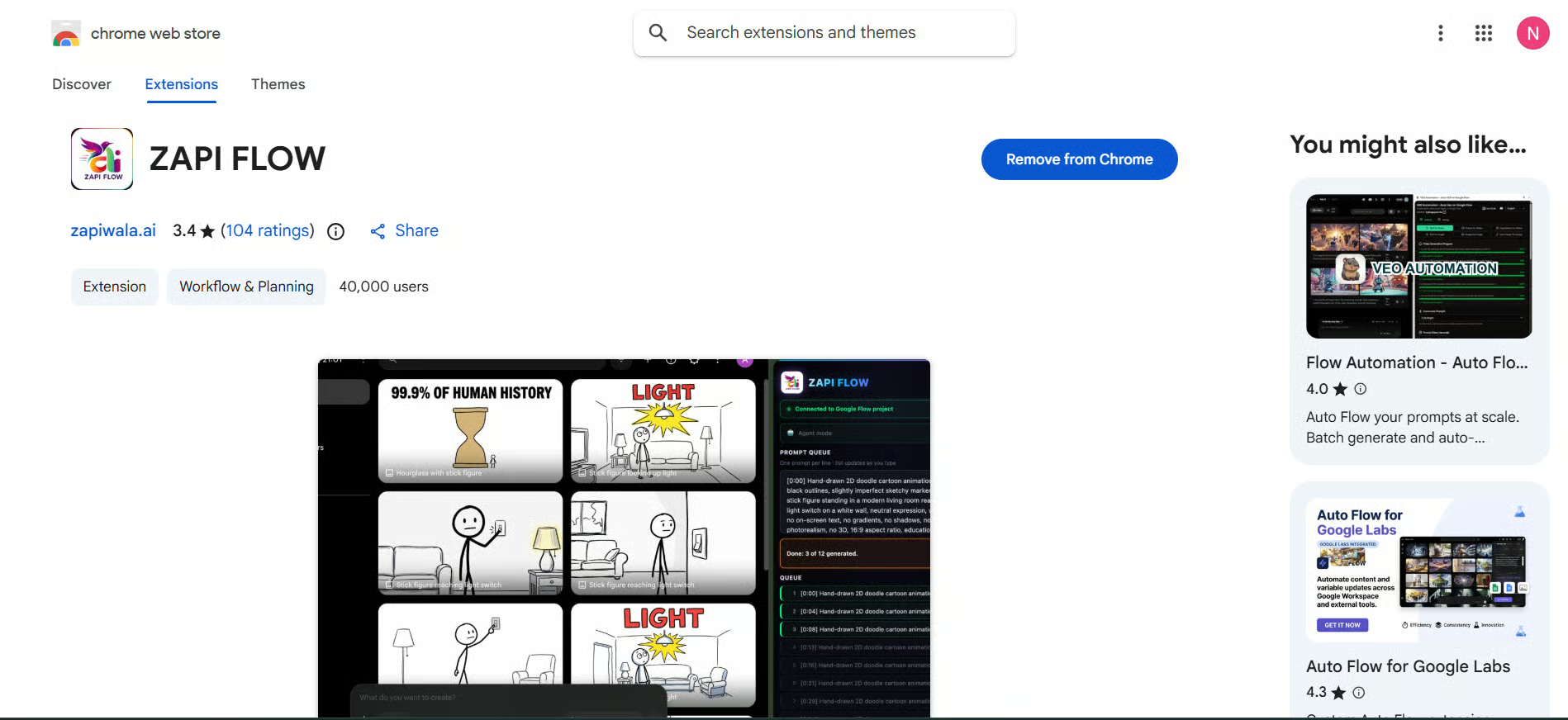
Install ZAPI Flow from the Chrome Web Store, then open it inside your Google Flow project. Before starting:

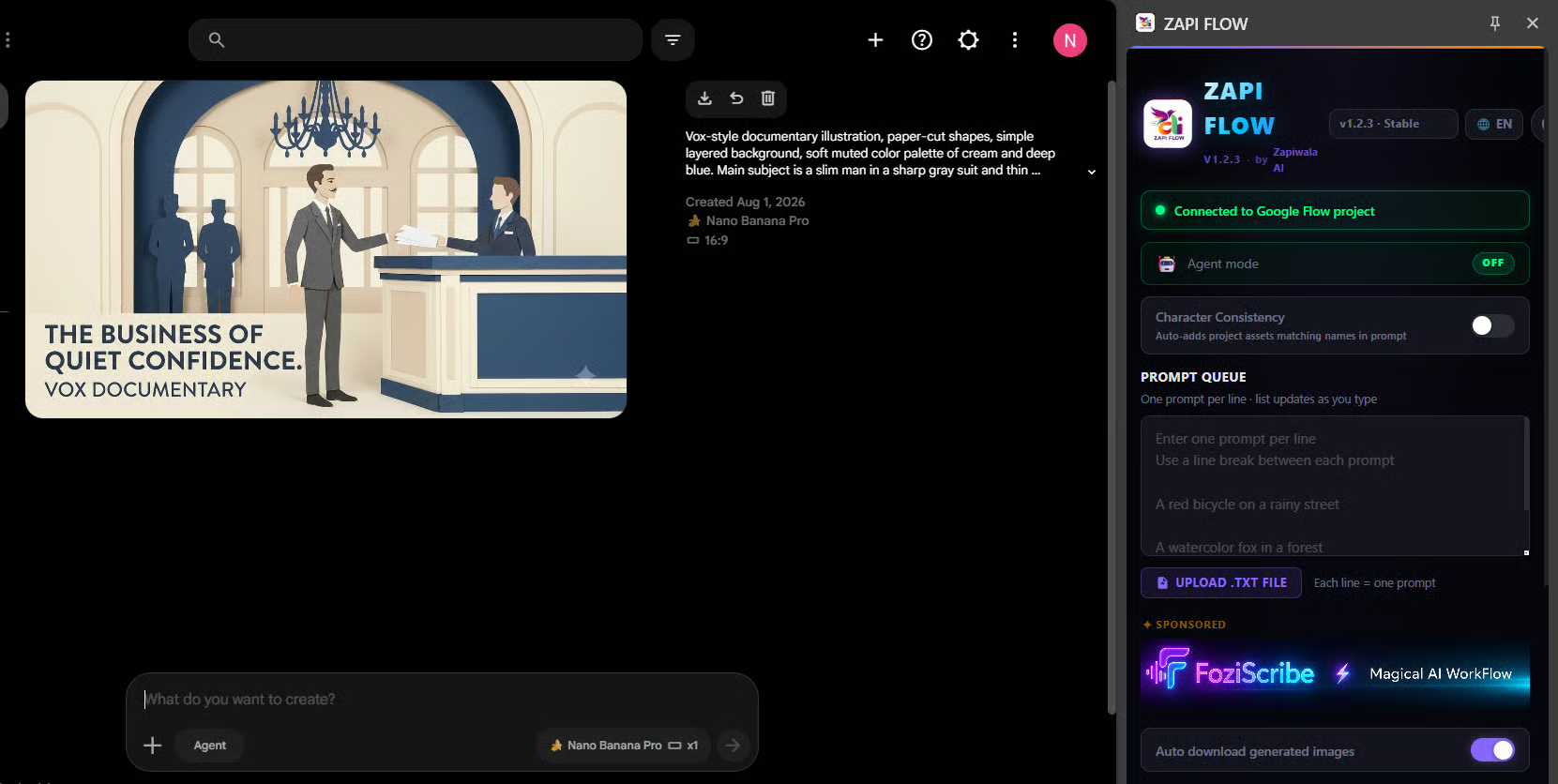
  • Check the connection status shows your project is detected
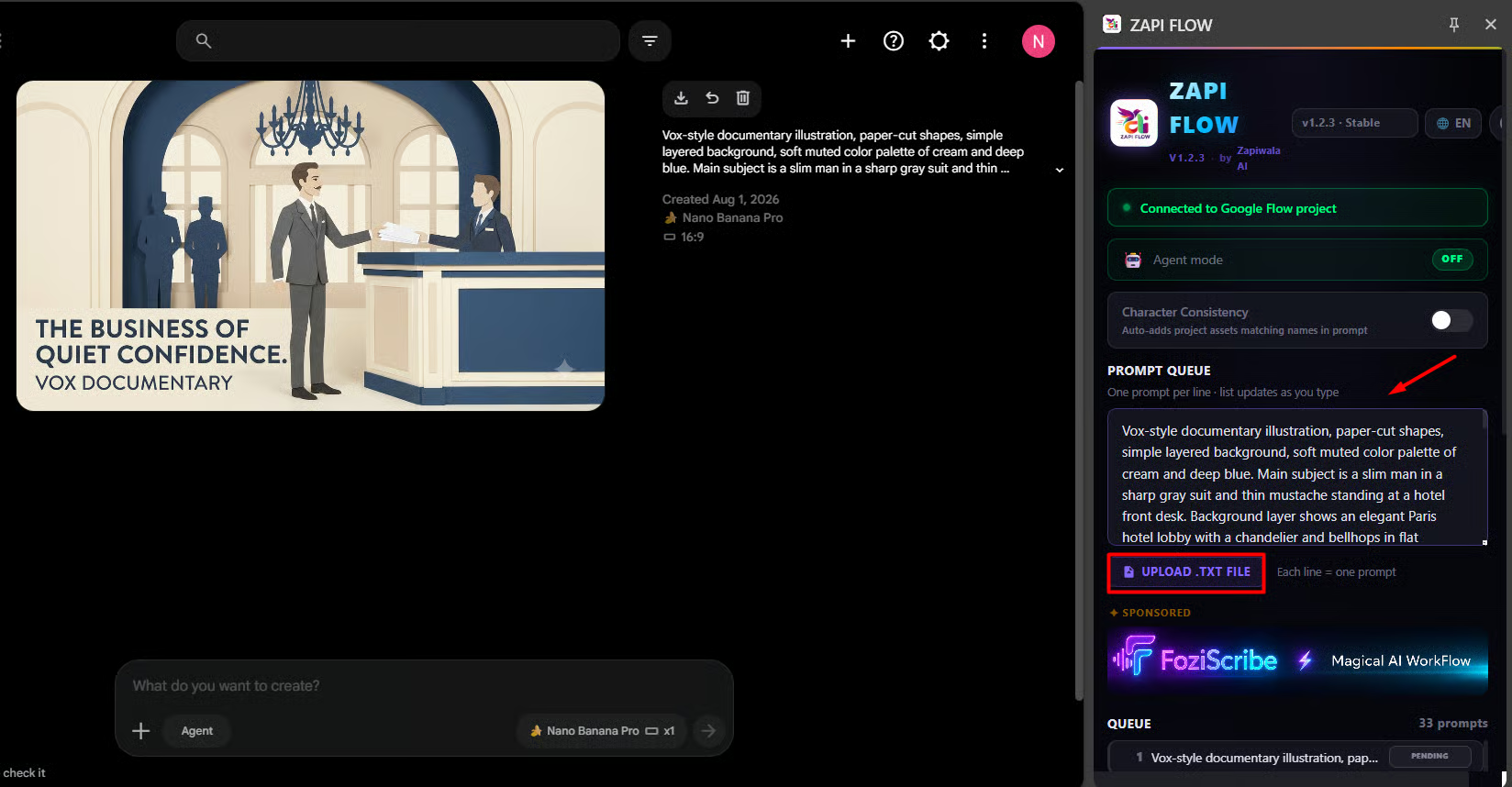
  • Upload the TXT file Claude created
  • Confirm the prompt count matches your number of visual beats
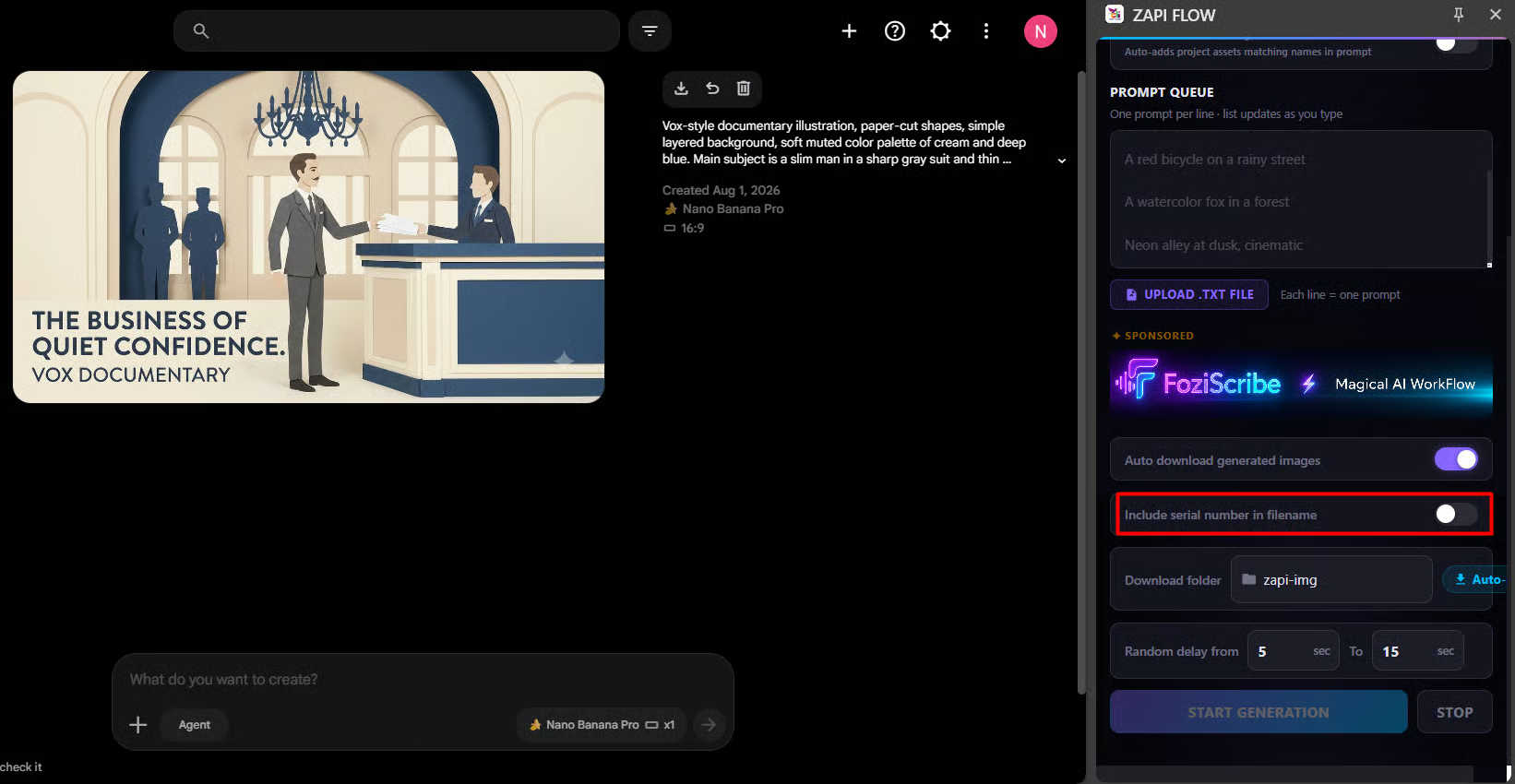
  • Toggle off "Include serial number in file name"if you don't want numbered filenames
ZAPI Flow Chrome Web Store extension interface
ZAPI Flow panel connected to Google Flow project showing prompt queue
ZAPI Flow toggle settings for serial number in filename

Each prompt should be on its own line, ZAPI Flow reads top to bottom, so the image order follows your story order automatically.

ZAPI Flow interface showing upload TXT file button and prompt queue

If ZAPI Flow can't detect the project, refresh Google Flow and reopen the extension. Don't hit Start Generation until the connection and prompt count both look correct.

3c. Run the Batch and Review

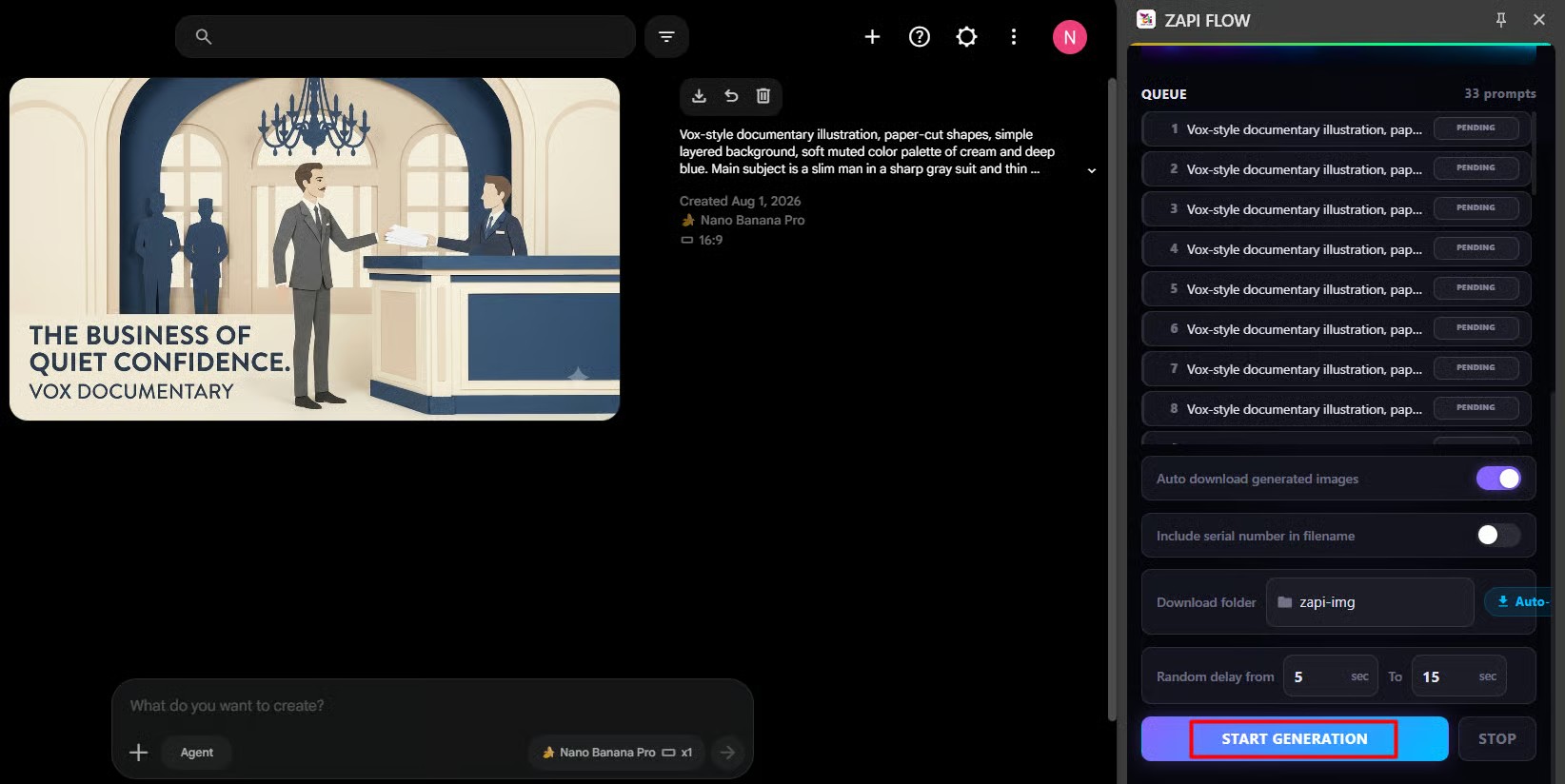
Click Start Generation. ZAPI Flow will send each prompt to Google Flow and wait for the image to finish before moving on. Watch the progress panel, don't assume it's running correctly just because it started.

ZAPI Flow running batch generation with Start Generation button highlighted
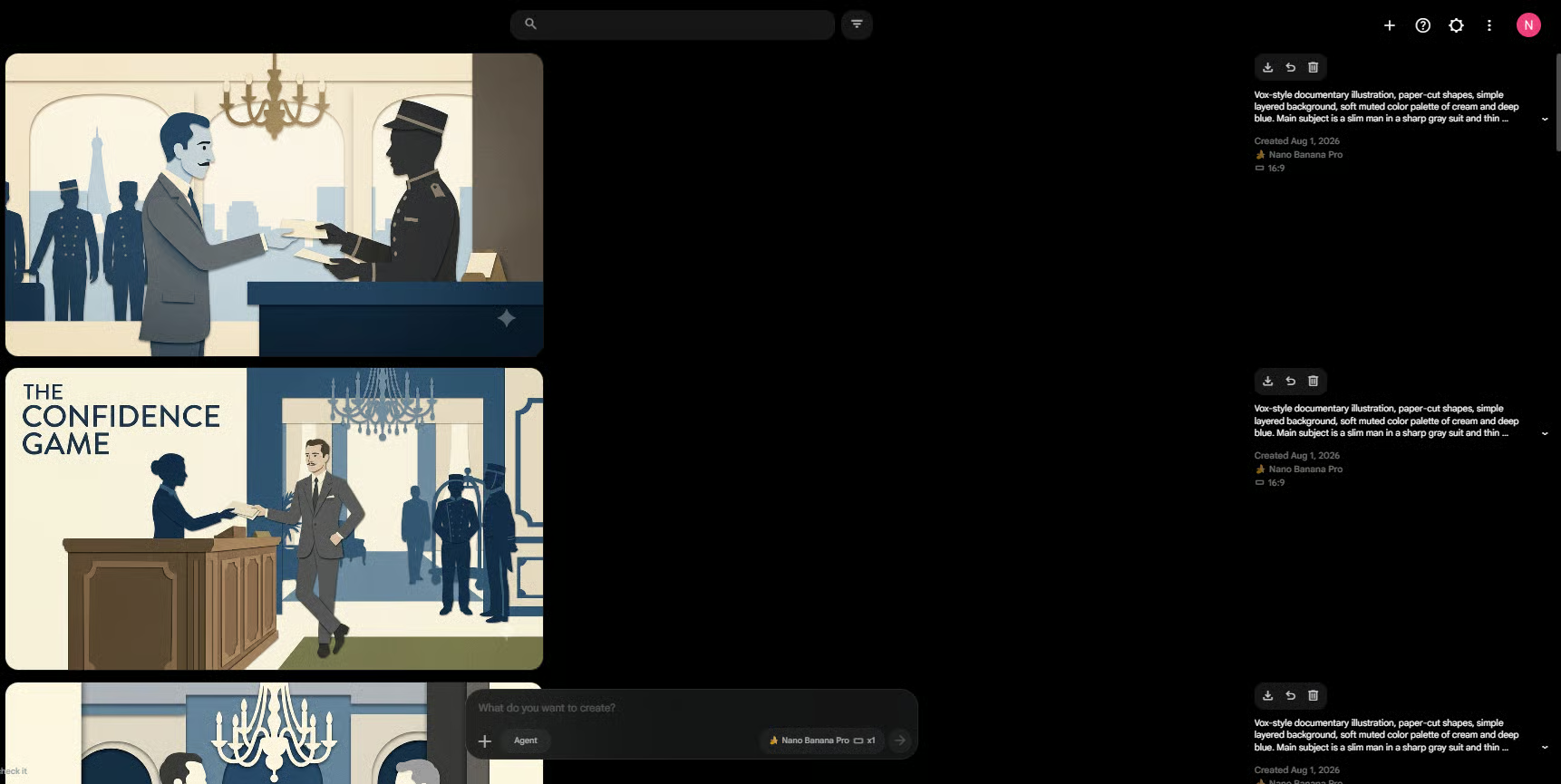
Google Flow interface showing multiple generated Vox documentary style images

Once the batch finishes, open your download folder and check the images in order. Look for:

  • Character looks the same (face, clothes, key features) across all scenes
  • Colors and paper-cut style stay consistent
  • Each image clearly matches its visual beat
  • No wrong text, extra objects, or broken details

If specific images came out wrong, regenerate just those ones. You don't need to redo the full batch.

How useful was this AI tool article for you? πŸ’»

Let us know how this article on AI tools helped with your work or learning. Your feedback helps us improve!

Extremely helpful, it's a game-changer! 🌟

Quite useful, it provided valuable insights! πŸ‘

Somewhat helpful, but I need more details! 🧐

Not very helpful, I expected more! ❓

Login or Subscribe to participate in polls.

Step 4: Animate Each Image Into a Clip

Now the still images become short video clips. This is where the paper-cut illustrations start to feel alive.

Each image becomes one clip of about 5 to 8 seconds. You process them one at a time: upload image, add animation prompt, generate, download, repeat.

4a. Create a Universal Animation Prompt in Claude

For this step, ask Claude to write one base animation prompt you'll reuse across every scene. This keeps the movement style consistent, the same way the image prompts kept the visual style consistent.

I want you to create a universal animation prompt for a Vox-style animated documentary video.

The prompt will be used with different still images in Google Flow.

Please follow these rules:

  • - Keep the movement natural and simple
  • - Use slow camera movement
  • - Add small motion to the main subject and background
  • - Keep the original composition and visual style
  • - Don't add new people, objects, or text
  • - Don't change the character's face, clothes, or key features
  • - Avoid fast movement, strong camera shakes, and dramatic effects
  • - Make the animation suitable for a 5 to 6-second clip

Return one clean animation prompt only.

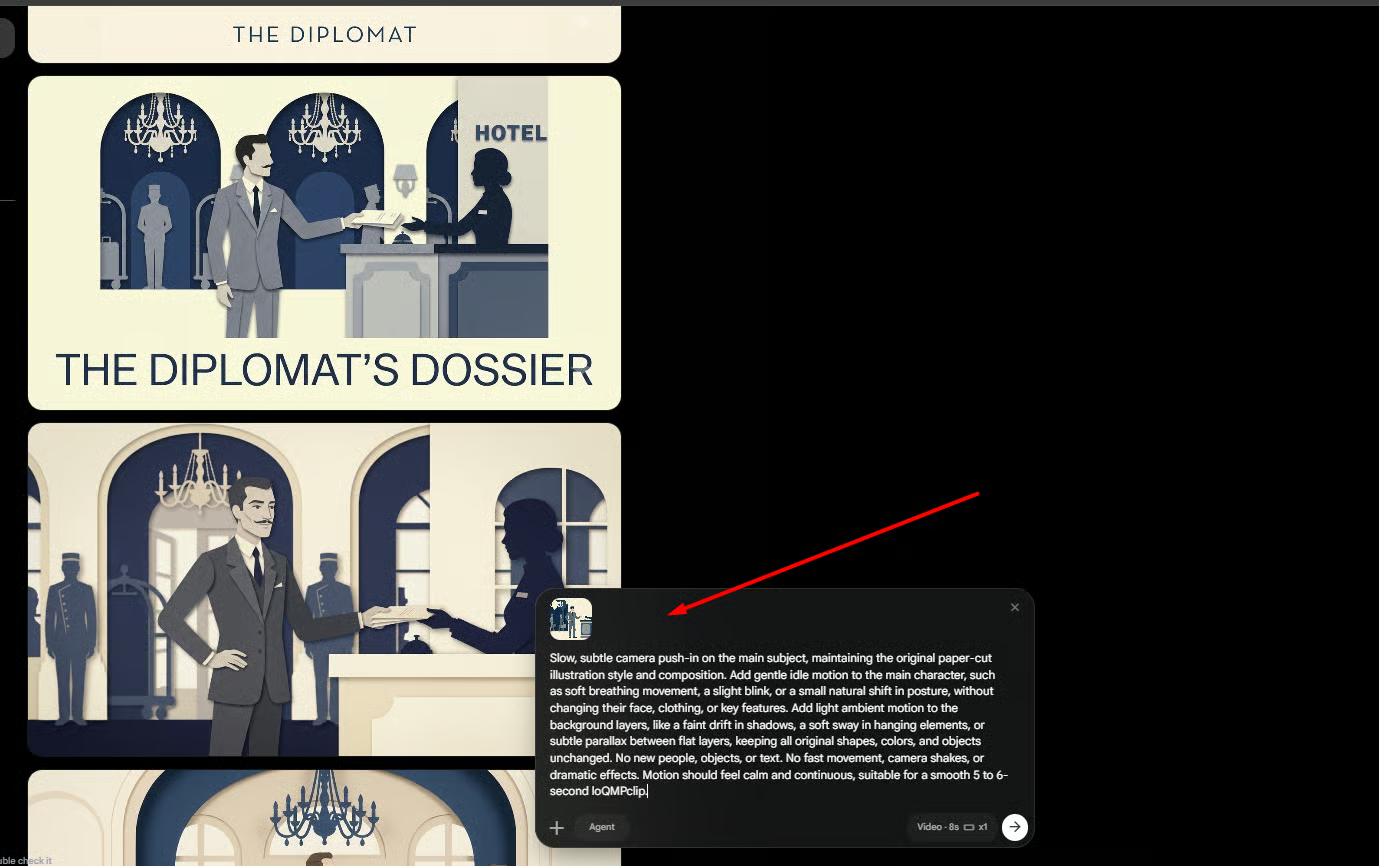
Slow, subtle camera push-in on the main subject, maintaining the original paper-cut illustration style and composition. Add gentle idle motion to the main character, such as soft breathing movement, a slight blink, or a small natural shift in posture, without changing their face, clothing, or key features. Add light ambient motion to the background layers, like a faint drift in shadows, a soft sway in hanging elements, or subtle parallax between flat layers, keeping all original shapes, colors, and objects unchanged. No new people, objects, or text. No fast movement, camera shakes, or dramatic effects. Motion should feel calm and continuous, suitable for a smooth 5 to 6-second clip.

For each scene, you'll paste this base prompt plus one short sentence describing the specific action in that beat, for example: "the character slowly hands a document across a table" or "the character turns their head toward the window."

4b. Generate Each Clip in Google Flow

Switch Google Flow to image-to-video mode (Veo 3.1). Then for each scene:

  1. Upload one image from your set
  2. Paste the universal animation prompt from Claude
  3. Add one sentence describing the movement for that specific scene
  4. Keep the aspect ratio at 16:9
  5. Generate a 5–8 second clip
  6. Download the clip, then move to the next image
Google Flow image-to-video generation interface showing uploaded scene and prompt

Process the images in the same order as your visual beats. This keeps everything in story order for CapCut.

After each clip generates, check it quickly before downloading:

After each clip generates, check it quickly before downloading:

  • Character keeps the same face and clothes
  • No new people, objects, or text appeared
  • The movement matches the visual beat
  • Camera doesn't move too fast or break the composition
  • Paper-cut style is still intact
Google Flow generated clip preview showing lobby scene with animated characters

If a clip has a problem, reduce the movement in the action sentence or regenerate. Once all clips look good, download them and move to editing.

Step 5: Assemble Everything in CapCut

This is the final step: putting the clips together into a finished video.

Open CapCut, start a new project, and import all your clips. Place them on the timeline in the same order as your visual beats.

Then go through these in order:

  1. Trim and paceβ†’ each clip is 5–8 seconds, but you may not need all of it. Cut to the moment you want.
  2. Review transitions→ light cuts or simple fades work better than dramatic transitions for a documentary style. Add them only where they help the story flow, not everywhere.
  3. Add text or captions→ if a key fact or name needs to appear on screen, this is where you add it.
  4. Check the full run-through→ watch the whole video once before exporting. Look for any pacing gaps, jarring cuts, or moments where the story loses momentum.
  5. Export→ 1080p, MP4. That's the standard for YouTube and most platforms.

Conclusion

By this point, you've used an AI animation generator workflow to turn one idea into a complete Vox-style animated video. Each part of the process has a clear job:

  • Claude prepares the script, visual beats, and prompts.
  • ZAPI Flow sends the image prompts to Google Flow in order.
  • Google Flow creates the images and adds motion to each scene.
  • CapCut connects the clips and gives you the final video.

You can reuse this entire workflow for history, business, education, or any story you want to animate. Change the topic and visual direction, keep the process the same.

If you are interested in other topics and how AI is transforming different aspects of our lives or even in making money using AI with more detailed, step-by-step guidance, you can find our other articles here:

Keep reading

Mastering Multi-Agent AI Workflows
EDITION #05 β€’ AUGUST 2026

🧠 Everyone Says Kimi K3 is 'Open'. I Checked What It Truly Takes to Run It (What to Use Instead)

β€œOpen” sounds simple right? After looking deeper, I found the hardware demands, practical challenges, and alternatives that could make more sense for most users.

Coreum Bridge Exploit
EDITION #06 β€’ August 2026

πŸ“‰ "Entry-Level" is Lying to You. Here's What the AI Job Market Actually Looks Like Now.

AI split the job market into 2 tracks. I'll show you where the job market is moving, what companies actually value now, and how to stay ahead.

Building Modern Web Apps
EDITION #03 β€’ JULY 2026

Building Modern Web Apps with Next.js & Tailwind

A complete architectural blueprint for launching fast developer tools.